


Complete Guide to JavaScript Array Methods: map(), filter(), and reduce()
- Home
- Complete Guide to JavaScript Array Methods: map(), filter(), and reduce()




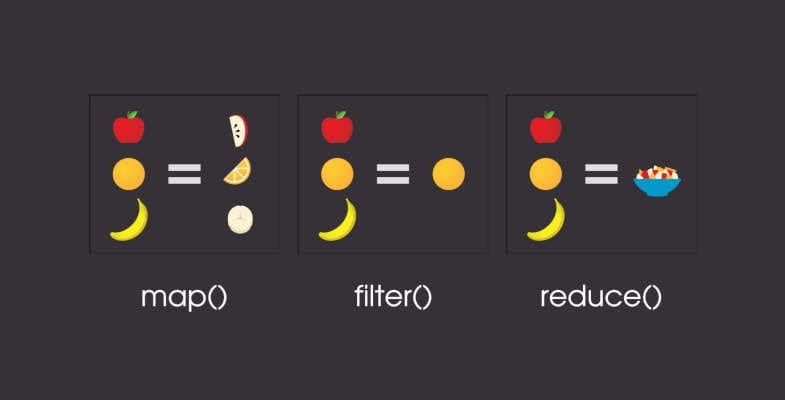
In modern JavaScript programming (ES6+), Functional Programming has become an indispensable standard. At the core of this approach are three incredibly powerful Array Methods: map(), filter(), and reduce().
Instead of using traditional loops like for or while, this trio makes your code concise, readable, maintainable, and helps minimize bugs (side effects).
map() Method – Data Transformationmap() used for?map() iterates through each element of the original array, applies a transformation function to it, and returns a NEW array containing the modified values. The original array remains unchanged (immutability).
const newArray = array.map((currentValue, index, array) => {
  // Return the new value for the newArray
});
Problem: Calculate the price with tax (10% VAT) for a list of products.
const products = [
  { name: 'Laptop', price: 1000 },
  { name: 'Phone', price: 500 },
  { name: 'Tablet', price: 300 }
];

const productsWithVAT = products.map(product => {
  return {
    ...product,
    priceWithVAT: product.price * 1.1
  };
});

console.log(productsWithVAT);
/*
[
  { name: 'Laptop', price: 1000, priceWithVAT: 1100 },
  { name: 'Phone', price: 500, priceWithVAT: 550 },
  { name: 'Tablet', price: 300, priceWithVAT: 330 }
]
*/
filter() Method – Conditional Filteringfilter() used for?True to its name, filter() is used to filter out elements that satisfy a specific condition. This method runs through each element and checks the return value of the callback function (true or false):
If true: The element is kept.
If false: The element is removed.
The returned result is a NEW array containing only the elements that meet the criteria.
const filteredArray = array.filter((currentValue, index, array) => {
  // Return true to keep the element, false to remove it
});
Problem: Filter the list of completed orders (status: 'completed').
const orders = [
  { id: 101, status: 'completed', total: 250 },
  { id: 102, status: 'pending', total: 120 },
  { id: 103, status: 'completed', total: 450 },
  { id: 104, status: 'cancelled', total: 90 }
];

const completedOrders = orders.filter(order => order.status === 'completed');

console.log(completedOrders);
/*
[
  { id: 101, status: 'completed', total: 250 },
  { id: 103, status: 'completed', total: 450 }
]
*/
reduce() Method – Accumulating Data Into a Single Valuereduce() used for?reduce() is the most powerful and flexible method of the three. It is used to iterate through the entire array and “accumulate” all elements into a single value (which could be a number, a string, an object, or even a new array).
const result = array.reduce((accumulator, currentValue, index, array) => {
  // Return the new value for the accumulator in the next iteration
}, initialValue);
accumulator: Stores the accumulated result after each iteration.
initialValue: The initial value of the accumulator. Note: Always pass an initialValue to avoid unexpected errors.
Problem 1: Calculate the total revenue from a cart list.
const cart = [
  { item: 'Keyboard', price: 50, quantity: 2 },
  { item: 'Mouse', price: 25, quantity: 1 },
  { item: 'Monitor', price: 200, quantity: 1 }
];

const totalBill = cart.reduce((total, item) => {
  return total + (item.price * item.quantity);
}, 0);

console.log(totalBill); // Output: 325 (50*2 + 25*1 + 200*1)
Problem 2: Classify and count the number of members by their role.
const users = [
  { name: 'An', role: 'admin' },
  { name: 'Binh', role: 'user' },
  { name: 'Cuong', role: 'user' },
  { name: 'Dung', role: 'editor' }
];

const roleCount = users.reduce((acc, user) => {
  acc[user.role] = (acc[user.role] || 0) + 1;
  return acc;
}, {});

console.log(roleCount);
// Output: { admin: 1, user: 2, editor: 1 }
map(), filter(), reduce()| Criteria | map() | filter() | reduce() |
| Main Purpose | Transform each element in the array | Filter elements based on a condition | Accumulate the array into a single value |
| Return Result | New array with the same length as the original | New array with a length $\le$ the original | Any arbitrary value (number, object, array…) |
| Mutates Original Array? | No | No | No |
The true power of Functional Programming shines when you combine all 3 methods together using Chaining.
Problem: You have a list of transactions. Calculate the total revenue from completed orders after applying a 10% discount to those orders.
const transactions = [
  { id: 1, amount: 100, status: 'completed' },
  { id: 2, amount: 200, status: 'pending' },
  { id: 3, amount: 300, status: 'completed' },
  { id: 4, amount: 50, status: 'completed' }
];

const totalRevenue = transactions
  // 1. Filter out completed orders
  .filter(item => item.status === 'completed')
  // 2. Calculate the price after a 10% discount for each order
  .map(item => item.amount * 0.9)
  // 3. Sum up all amounts
  .reduce((sum, amount) => sum + amount, 0);

console.log(totalRevenue);
// Explanation: (100*0.9) + (300*0.9) + (50*0.9) = 90 + 270 + 45 = 405
Use map() when you want to transform each element of an array.
Use filter() when you want to select a subset from the original array.
Use reduce() when you want to aggregate an array into a single result.
Mastering the trio of map(), filter(), and reduce() will make your JavaScript source code much more standard, clean, and optimized. Happy learning at DC SoftTech!